Shoulder Surfing Myths Debunked: What Visual Theft Really Looks Like
Attackers rarely need to read your screen directly; they often capture data through reflected light, camera angles, or by watching your finger movements on a physical keyboard.
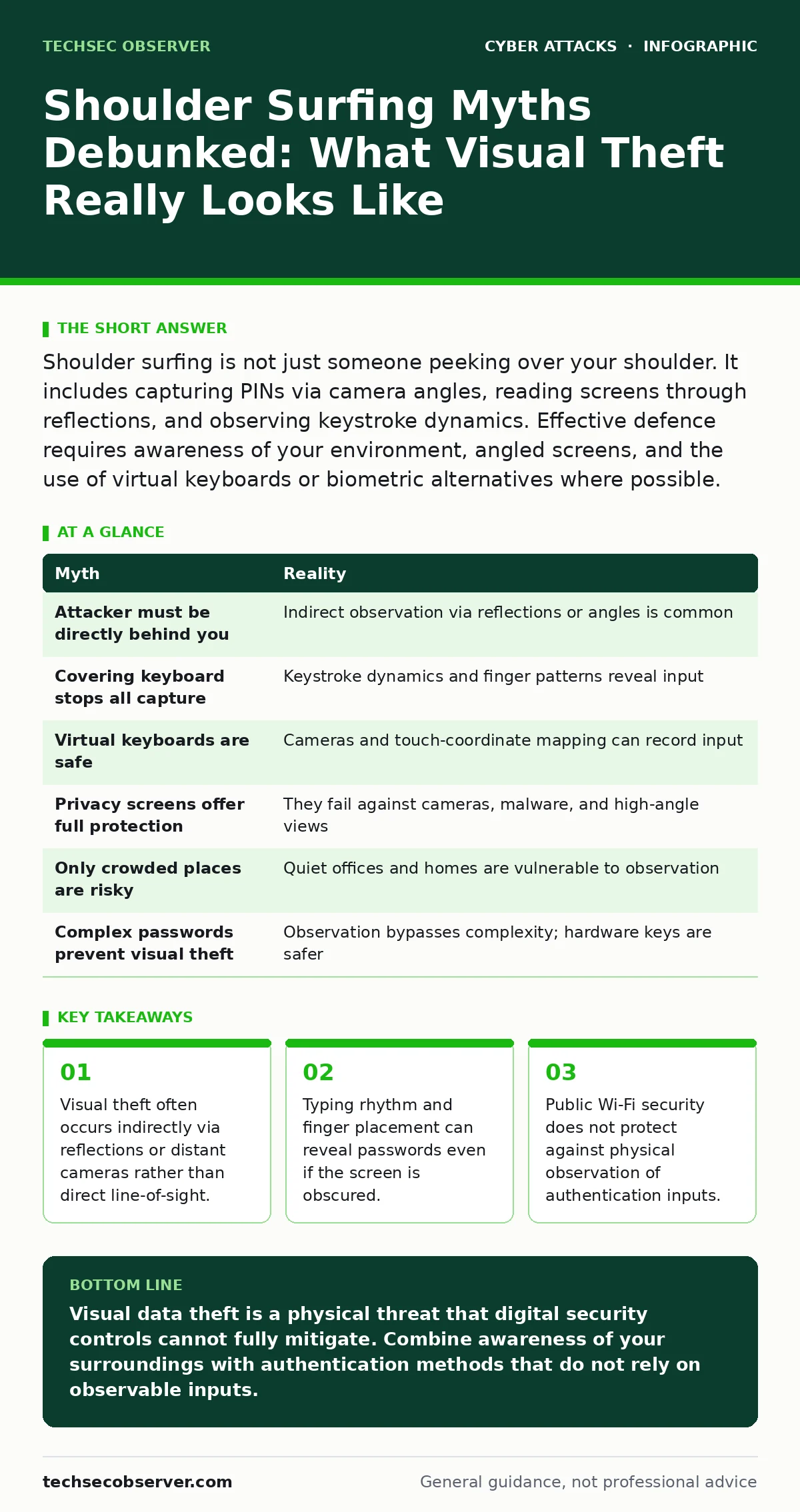
Shoulder surfing is not just someone peeking over your shoulder. It includes capturing PINs via camera angles, reading screens through reflections, and observing keystroke dynamics. Effective defence requires awareness of your environment, angled screens, and the use of virtual keyboards or biometric alternatives where possible.
Myth: The attacker must stand directly behind you
Reality: Direct line-of-sight is the least efficient method for visual data theft. Most successful incidents involve indirect observation. Attackers position themselves at angles where they can see your screen via reflection in windows, polished tables, or even the glossy surface of your own device.
Imagine sitting in a bright café. The sunlight hits your laptop screen and reflects onto the glass partition opposite you. An observer sitting across the room sees your password clearly in that reflection, while you believe your screen is shielded from view.
This mechanism exploits the physics of light rather than human proximity. You do not need to feel someone breathing down your neck to be compromised. The threat exists wherever light can bounce from your display to an observer’s eye.
Myth: Covering the keyboard blocks all visual capture
Reality: Obscuring the keys with your hand protects against direct viewing of the characters you press, but it fails against side-channel attacks. Attackers can deduce your input by watching the pattern of your finger movements, the speed of your typing, and the sequence of key presses.
This is known as keystroke dynamics analysis. If you type slowly or hesitate on certain characters, an observer can map your finger trajectory. Even if they cannot see the specific keys, the unique rhythm of your typing can reveal the password structure or even the exact characters if they have seen you type once before.
Furthermore, covering the keyboard draws attention to the act of typing. This signals to nearby observers that you are entering sensitive data, prompting them to focus their attention on your hands rather than your screen.
Myth: Virtual keyboards eliminate the risk of visual theft
Reality: On-screen keyboards introduce a different vulnerability: the camera. Many modern devices have high-resolution cameras that can record the screen from a distance. If an attacker has compromised your device or is using a nearby camera, they can record your screen as you tap the virtual keys.
Unlike a physical keyboard, a virtual keyboard does not change the position of the letters. If you always tap 'A' in the same spot, a video recording can reveal your input pattern over time. Some attackers use software to map touch coordinates to specific characters, bypassing the randomisation features often built into mobile operating systems.
Additionally, virtual keyboards are slower to use. This increased dwell time gives observers more opportunity to watch your interaction with the device. The trade-off between convenience and security is often miscalculated by users who assume digital input is inherently more private.
Myth: Privacy screens fully protect against shoulder surfing
Reality: Privacy filters, which restrict the viewing angle of a display, are effective only against direct observation. They do not prevent data capture via high-angle cameras, reflections, or screenshots taken by malware.
If an attacker has physical access to your device, they can take a screenshot of your password field before you finish typing. Privacy filters offer no protection against this vector. Similarly, a camera positioned above your device can capture the screen content regardless of the filter’s angular restrictions.
Privacy filters also degrade image quality and reduce brightness, which can lead to eye strain and reduced productivity. This hidden cost often leads users to remove the filters, inadvertently re-exposing their data. They are a partial defence, not a complete solution.
Myth: Shoulder surfing only happens in crowded places
Reality: Visual theft is equally prevalent in quiet, seemingly secure environments. Offices with glass walls, open-plan layouts, or poor seating arrangements facilitate observation by colleagues or contractors. The assumption that privacy is guaranteed in a private office is often false.
Imagine working in a corner office. You believe you are alone, but a cleaning staff member or a technician entering the room can observe your screen from the doorway. The lack of social pressure in these moments makes attackers bolder, as they do not fear being challenged by bystanders.
Remote workers face similar risks at home. Family members, roommates, or delivery personnel can observe screens through windows or open doors. The domestic environment often lacks the physical security controls found in corporate settings, making it a high-risk zone for visual data leakage.
Myth: Strong passwords negate the need for physical security
Reality: No matter how complex your password is, it is useless if observed during entry. A twelve-character alphanumeric string is trivial to steal if an attacker watches you type it once. Complexity does not add resistance to visual observation; it only increases the time required for the attacker to memorise the sequence.
This misconception leads to a false sense of security. Users invest time in creating complex passwords but neglect the physical context of authentication. They treat cybersecurity as purely a digital problem, ignoring the human and environmental factors.
Phishing-resistant authentication methods, such as hardware keys or biometrics, reduce reliance on passwords. These methods shift the authentication factor from something you know to something you have or are, which is harder to steal visually. Integrating these methods into your workflow reduces the surface area for shoulder surfing attacks.
| Myth | Reality |
|---|---|
| Attacker must be directly behind you | Indirect observation via reflections or angles is common |
| Covering keyboard stops all capture | Keystroke dynamics and finger patterns reveal input |
| Virtual keyboards are safe | Cameras and touch-coordinate mapping can record input |
| Privacy screens offer full protection | They fail against cameras, malware, and high-angle views |
| Only crowded places are risky | Quiet offices and homes are vulnerable to observation |
| Complex passwords prevent visual theft | Observation bypasses complexity; hardware keys are safer |
Key takeaways
- Visual theft often occurs indirectly via reflections or distant cameras rather than direct line-of-sight.
- Typing rhythm and finger placement can reveal passwords even if the screen is obscured.
- Public Wi-Fi security does not protect against physical observation of authentication inputs.
Visual data theft is a physical threat that digital security controls cannot fully mitigate. Combine awareness of your surroundings with authentication methods that do not rely on observable inputs.
Frequently asked questions
How far away can an attacker read my screen?
Distance depends on screen resolution, brightness, and the attacker’s visual acuity. High-resolution screens can be read from several metres away with the aid of binoculars or zoom lenses.
Does using a password manager prevent shoulder surfing?
Password managers store credentials securely but do not prevent observation during the initial entry or if the attacker sees the password being auto-filled. They reduce the frequency of manual entry, lowering exposure risk.
Are biometrics safer than passwords against visual theft?
Biometrics, such as fingerprints or facial recognition, are harder to steal visually. However, they can be spoofed with high-quality replicas or photos. They offer a different security profile, not absolute immunity.
Can software detect if someone is looking at my screen?
Some enterprise security tools use camera-based gaze tracking to detect secondary observers. These systems are not widely deployed and can raise privacy concerns, limiting their adoption in general use.
How this guide was produced: written by the TechSec Observer editorial team with AI assistance, checked against the public references listed below, and reviewed when the facts change. See our editorial policy or report an error.