Implement Digital Forensics: A Step-by-Step Guide for Preservation
Evidence integrity fails when you power down a compromised system, as volatile memory contains the only record of active decryption keys and network connections.

Implement digital forensics by securing volatile memory before storage, using write-blockers for physical media, and maintaining a strict chain of custody. You verify readiness through tabletop simulations and regular tool audits. This process ensures legal admissibility and technical accuracy during incident response.
Secure Volatile Memory Before Storage
System memory contains data that disappears immediately upon power loss. This includes running processes, open network sockets, and decrypted files. If you shut down a compromised machine to "save" the hard drive, you erase the context of the attack. The attacker may have encrypted the disk, but the decryption key resides in RAM. Capturing this memory requires a dedicated imaging tool that reads from the physical address space without altering it.
You verify this step by comparing the captured memory image against a known-good hash of a clean system state. Discrepancies indicate active processes or injected code. This comparison reveals whether the system was compromised before the incident response began. Without this baseline, you cannot distinguish between normal system behaviour and malicious activity.
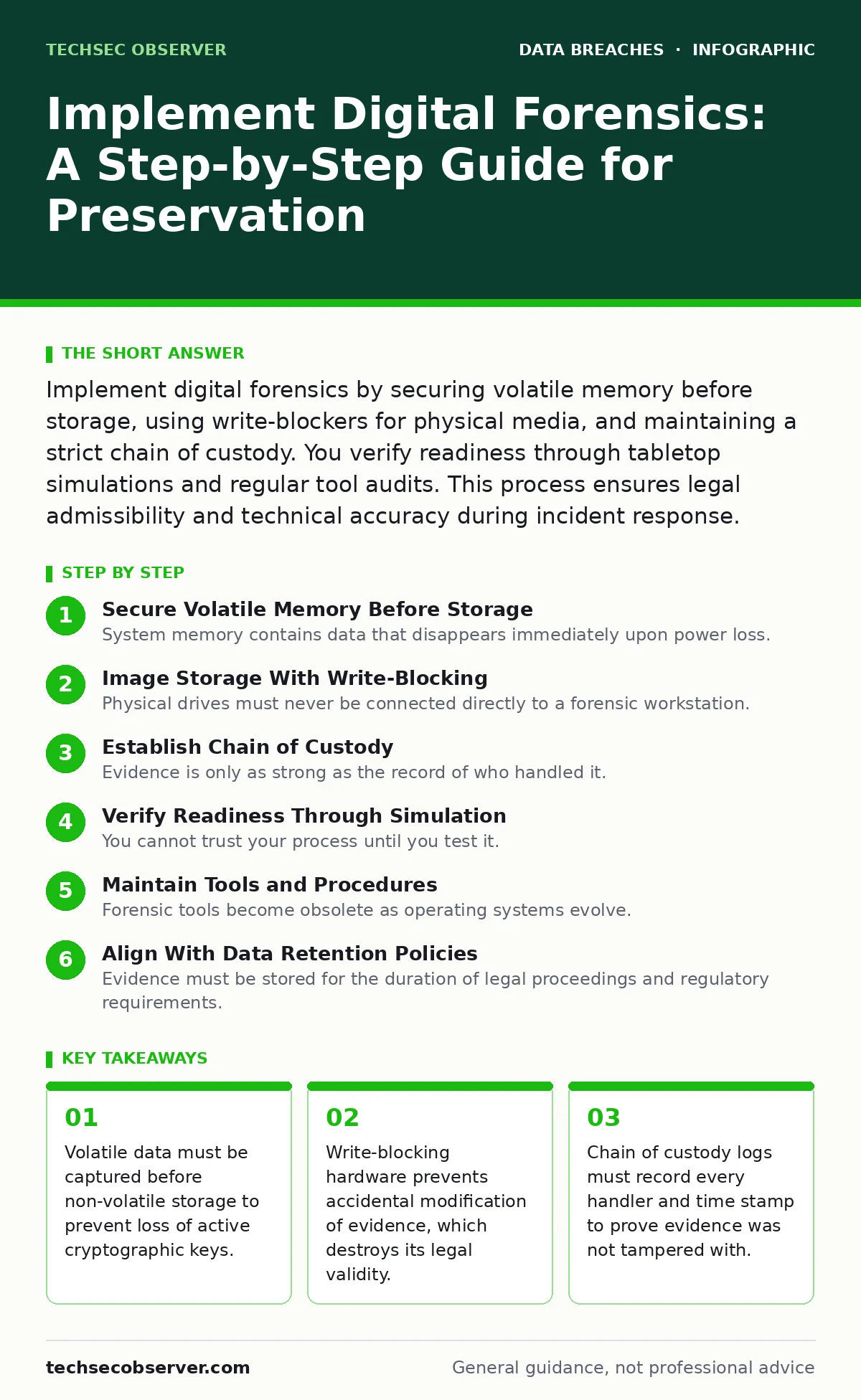
Image Storage With Write-Blocking
Physical drives must never be connected directly to a forensic workstation. Direct connection allows the operating system to write metadata, timestamps, or cache data to the source drive. This alteration renders the evidence inadmissible in legal proceedings and corrupts the timeline of events. You use a hardware write-blocker or a software equivalent that forces read-only access. The device presents the source drive to the investigator as a read-only volume, preventing any write commands from reaching the platters.
Verification occurs by checking the write-blocker status indicator and logging the hash of the source drive before and after imaging. The hash values must match exactly. If they differ, the imaging process failed or the drive was written to. You repeat the imaging process with a new media set until the hashes align. This ensures the digital evidence remains an exact bit-for-bit copy of the original.
Establish Chain of Custody
Evidence is only as strong as the record of who handled it. A break in the chain of custody allows defenders to claim the evidence was planted or altered. You document every transfer of physical or digital evidence. This includes the name of the person, the date, the time, and the reason for the transfer. Digital logs should be immutable, using cryptographic signing to prevent retroactive edits. Physical evidence requires tamper-evident seals and signed paper logs.
You check this step by auditing a sample of recent custody records. Look for gaps in time where the evidence was unattended or unlogged. Any gap requires an explanation and a corrective action. Consistent logging builds trust with legal teams and external auditors. It prevents the defence from dismissing your findings on procedural grounds rather than technical merit.
Step 1: Define Scope and Legal Authority
Before touching any system, you must define what you are investigating and why. Legal authority varies by jurisdiction and employment contract. You cannot seize personal devices without explicit consent or a court order. Define the boundaries of the investigation to avoid privacy violations. This step prevents the discovery of irrelevant data that could lead to secondary liability.
You tell this step worked by obtaining a signed authorisation document. This document lists the systems to be examined, the data types permitted for collection, and the legal basis for the action. Without this paper trail, any evidence gathered may be suppressed. The scope document also guides the technical team to focus on relevant artefacts, saving time and storage resources.
Step 2: Capture Volatile Data
Power is the enemy of volatile evidence. You connect a forensic boot media to the target system and initiate a memory dump. This process reads the RAM contents and writes them to a separate, secure storage device. The dump file is large and requires fast transfer speeds. You use tools that support memory compression to reduce the file size without losing data integrity.
Verification involves calculating a cryptographic hash of the memory dump immediately after capture. You store this hash in your case notes. Later analysis compares this hash to ensure the dump has not been corrupted. If the hash changes, the dump is unusable. This step ensures that the initial state of the system is preserved for later analysis.
Step 3: Image Non-Volatile Storage
With memory secured, you image the hard drives. You connect the drive through a write-blocker to a forensic workstation. The imaging software creates a bit-level copy of the entire drive, including unallocated space. Unallocated space often contains fragments of deleted files that are crucial to the investigation. You use forensic file formats that include metadata and hash verification blocks.
You check this step by verifying the hash of the image against the source drive. The image must be a perfect clone. You also check the image file structure for errors. A corrupted image can lead to false positives during analysis. This step provides a stable copy of the data that analysts can examine without risking the original evidence.
Step 4: Analyse and Document Findings
Analysis requires specialised software to parse file systems, registry keys, and network logs. You look for anomalies such as unusual login times, unknown processes, or modified system files. Document every finding with screenshots and log excerpts. Correlate findings with the timeline of the incident. This step transforms raw data into actionable intelligence.
Verification is achieved by peer review. Another analyst reviews your findings and methodology. They check for logical gaps or unsupported conclusions. This independent check ensures the analysis is objective and repeatable. It reduces the risk of confirmation bias, where the investigator only sees what they expect to find.
Verify Readiness Through Simulation
You cannot trust your process until you test it. Tabletop exercises simulate an incident and walk through the forensics steps. Participants identify gaps in tools, training, or legal authority. These exercises reveal hidden dependencies, such as missing credentials for remote imaging tools. You run these simulations at least twice a year to account for changes in infrastructure.
You check readiness by measuring the time to capture evidence in the simulation. Compare this against your service level agreements. If the process is too slow, you refine the workflow. You also test the restoration of evidence from backups. This ensures that your imaging tools can read the backup formats used in production.
Maintain Tools and Procedures
Forensic tools become obsolete as operating systems evolve. A tool that works on Windows 10 may fail on newer kernels. You maintain a repository of supported tools and versions. You test new tools in a isolated lab environment before deploying them to incidents. This prevents failures during critical investigations. You also update your procedures to reflect new legal requirements or technical standards.
Verification involves quarterly audits of the toolchain. You check for security updates and compatibility issues. You also review legal guidelines for changes in data privacy laws. This upkeep ensures your forensics capability remains effective and compliant. Neglecting this step leads to failed investigations and legal challenges.
Align With Data Retention Policies
Evidence must be stored for the duration of legal proceedings and regulatory requirements. You align your forensics storage with your data retention policies. This ensures evidence is not deleted prematurely. You also ensure storage is secure and accessible only to authorised personnel. Long-term storage requires integrity checks to detect bit rot or corruption.
You check this alignment by reviewing storage contracts and internal policies. Ensure the retention period matches legal statutes of limitation. You also test the retrieval process for old evidence. This ensures that data stored years ago can still be accessed and verified when needed.
Key takeaways
- Volatile data must be captured before non-volatile storage to prevent loss of active cryptographic keys.
- Write-blocking hardware prevents accidental modification of evidence, which destroys its legal validity.
- Chain of custody logs must record every handler and time stamp to prove evidence was not tampered with.
Frequently asked questions
Should I use cloud storage for forensic images?
Cloud storage introduces jurisdictional and privacy risks. Ensure the provider offers encryption at rest and in transit. Verify that the data centre location complies with local laws regarding evidence handling.
How long should I keep forensic evidence?
Retention periods depend on legal statutes and internal policies. Typically, evidence is kept until the legal case is closed and appeal periods expire. Consult legal counsel for specific duration requirements.
Can I use automated tools for initial triage?
Automated tools can help prioritise systems. However, they must be validated against known samples. Manual verification is required for any evidence presented in legal proceedings.
What if the suspect deletes the logs?
Deleted data often remains in unallocated space. Forensic imaging captures the entire drive, including deleted sectors. Recovery tools can reconstruct fragments of deleted logs for analysis.
How this guide was produced: written by the TechSec Observer editorial team with AI assistance, checked against the public references listed below, and reviewed when the facts change. See our editorial policy or report an error.