Email aliases vs forwarding: the precise difference for privacy
Aliases hide your real address at the protocol level, while forwarding merely routes messages after they arrive, leaving your true identity visible to senders.
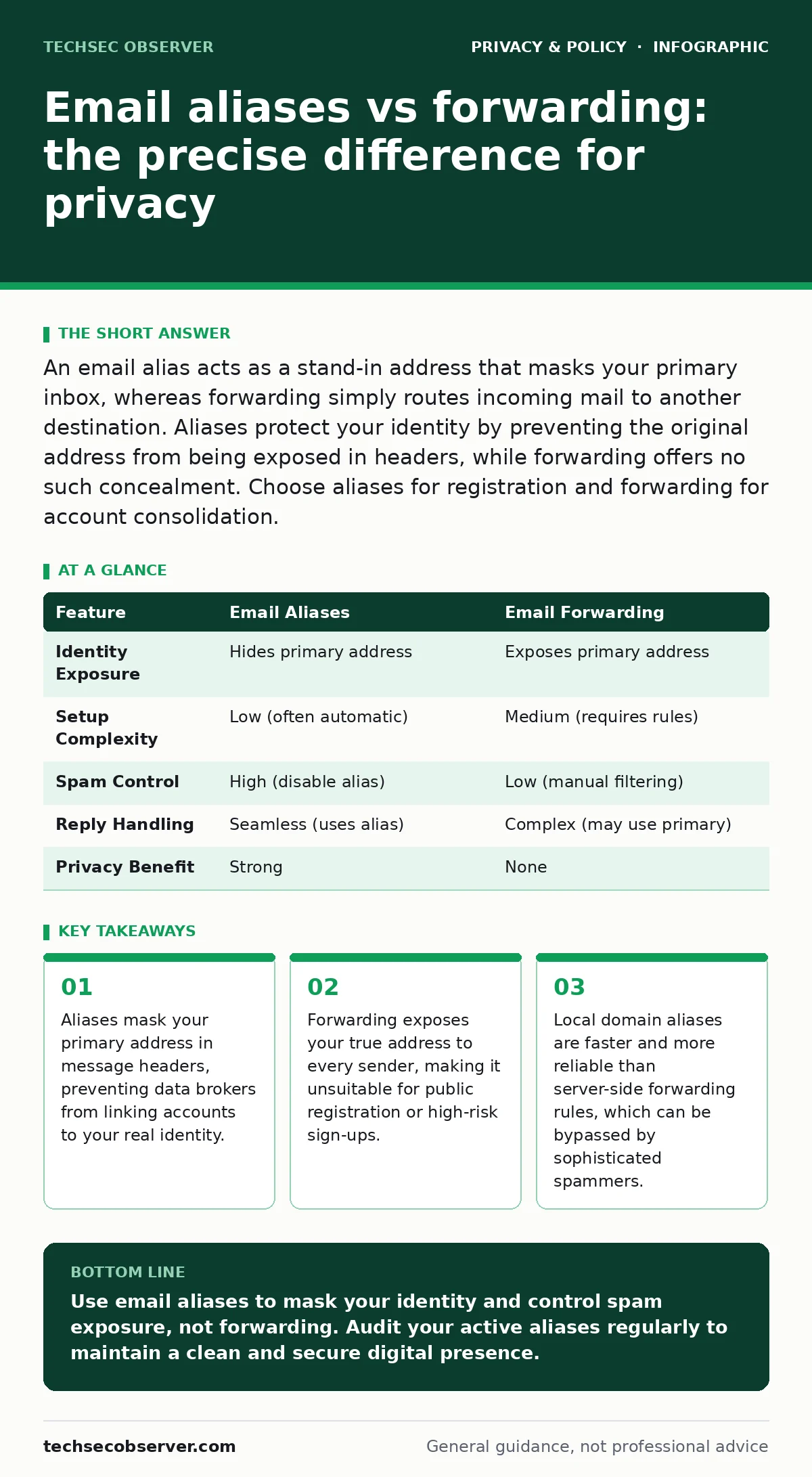
An email alias acts as a stand-in address that masks your primary inbox, whereas forwarding simply routes incoming mail to another destination. Aliases protect your identity by preventing the original address from being exposed in headers, while forwarding offers no such concealment. Choose aliases for registration and forwarding for account consolidation.
What is the difference between email aliases and forwarding?
Email aliases and forwarding serve distinct purposes in message handling, with aliases providing identity concealment and forwarding providing delivery redirection. An alias is an alternative address that resolves to your primary inbox without revealing the primary address to the sender. Forwarding is a mechanism that copies or moves received messages to another mailbox after they have already arrived at the primary server. The key distinction lies in visibility: aliases hide your true address, while forwarding leaves it exposed in the message headers.
How do email aliases protect your identity?
Email aliases protect your identity by ensuring the recipient’s mail server never sees your primary address. When you send mail from an alias, the system replaces the return path with the alias address. When you receive mail, the server accepts it for the alias and delivers it to your primary inbox. This breaks the link between your real identity and the service you are registering for. It prevents data brokers from correlating your activities across different platforms.
When should you use email forwarding instead?
You should use email forwarding when you need to consolidate multiple accounts into a single inbox without changing the source address. This is useful for managing professional roles where the sender expects to see the departmental address, such as [email protected]. It is also appropriate for temporary access, such as forwarding messages from a secondary account during a vacation. Forwarding does not offer privacy benefits, so avoid it for public-facing registrations or sensitive communications.
Which method is more reliable for filtering spam?
Email aliases are more reliable for filtering spam because you can disable specific aliases instantly. Suppose you use a unique alias for a newsletter. If that alias starts receiving unsolicited messages, you can delete the alias and block all related traffic. Forwarding requires manual rule adjustments on the receiving server, which is slower and less granular. Aliases allow you to isolate and extinguish spam sources at the point of entry, reducing the load on your primary inbox filters.
| Feature | Email Aliases | Email Forwarding |
|---|---|---|
| Identity Exposure | Hides primary address | Exposes primary address |
| Setup Complexity | Low (often automatic) | Medium (requires rules) |
| Spam Control | High (disable alias) | Low (manual filtering) |
| Reply Handling | Seamless (uses alias) | Complex (may use primary) |
| Privacy Benefit | Strong | None |
What are the technical limitations of aliases?
Aliases have technical limitations regarding reply-to headers and authentication. Some mail clients may still insert your primary address in the Reply-To field if not configured correctly. This exposes your identity to anyone who replies to your message. Additionally, aliases may not support all email authentication protocols, such as DKIM, which can cause delivered messages to be flagged as spam. You must verify that your mail provider signs outgoing mail for the alias domain to maintain deliverability.
See also: Block Wi-Fi Finder Apps From Mapping Your Network · Differential privacy census: how noise protects your data
How do aliases affect metadata exposure?
Aliases reduce metadata exposure by preventing the correlation of your email address with other personal data. Without an alias, every service you register with adds your primary address to their database. These databases are often shared or breached, allowing third parties to build a profile of your interests and habits. Using unique aliases for each service fragments this data, making it difficult for aggregators to link your activities. This approach aligns with the principles of reducing your digital footprint by minimizing the amount of identifiable data you share.
Can aliases be used for two-factor authentication?
Aliases can be used for two-factor authentication, but they introduce a risk if the alias is disabled. If you lose access to the alias or it is deactivated, you may be locked out of the associated account. To mitigate this, always maintain a backup recovery method, such as a phone number or a secondary email address. Do not rely solely on an alias for critical account recovery. Some services may not recognize aliases as valid contact methods, so test this functionality before committing to an alias for security-critical registrations.
What are the best practices for managing aliases?
Best practices for managing aliases include using a consistent naming scheme and regularly auditing active aliases. Create aliases that indicate the service or purpose, such as news.service.com or shop.retail.com. This makes it easy to identify the source of unwanted messages. Review your list of active aliases periodically and disable those that are no longer in use. This reduces the attack surface and keeps your inbox clean. Consider using a privacy-focused browser to avoid accidental data leakage when registering for new services with these aliases.
How do aliases compare to sub-addressing?
Sub-addressing, often called plus-addressing, is a form of aliasing where you add a tag after a plus sign, such as [email protected]. It is simpler to set up but less private than true aliases. The primary address is still visible in the message headers, and many services strip the tag during processing. True aliases, managed by the mail provider, offer better privacy and control. Sub-addressing is useful for quick, low-risk registrations, but true aliases are superior for long-term privacy protection.
Key takeaways
- Aliases mask your primary address in message headers, preventing data brokers from linking accounts to your real identity.
- Forwarding exposes your true address to every sender, making it unsuitable for public registration or high-risk sign-ups.
- Local domain aliases are faster and more reliable than server-side forwarding rules, which can be bypassed by sophisticated spammers.
Use email aliases to mask your identity and control spam exposure, not forwarding. Audit your active aliases regularly to maintain a clean and secure digital presence.
Frequently asked questions
Can I use an alias for my bank account?
Yes, but ensure the alias is permanent and never disable it. Banks may send critical alerts, and losing access to the alias could lock you out of your financial accounts.
Do free email providers support aliases?
Many free providers support sub-addressing, but true aliases are often a premium feature. Check your provider’s documentation to see if they offer full alias management.
Will aliases affect my email deliverability?
Properly configured aliases should not affect deliverability. Ensure your mail provider supports authentication protocols like SPF and DKIM for the alias domain to prevent messages from being flagged as spam.
How do I recover an account if I lose an alias?
Maintain a backup recovery method, such as a phone number or secondary email. If you lose access to the alias, use the backup method to regain access and update the contact information.
How this guide was produced: written by the TechSec Observer editorial team with AI assistance, checked against the public references listed below, and reviewed when the facts change. See our editorial policy or report an error.