Smart Home Security Best Practices: Seven Technical Controls
Most smart home breaches occur not through wireless hacking, but via default credentials and unpatched firmware on devices that never receive updates.
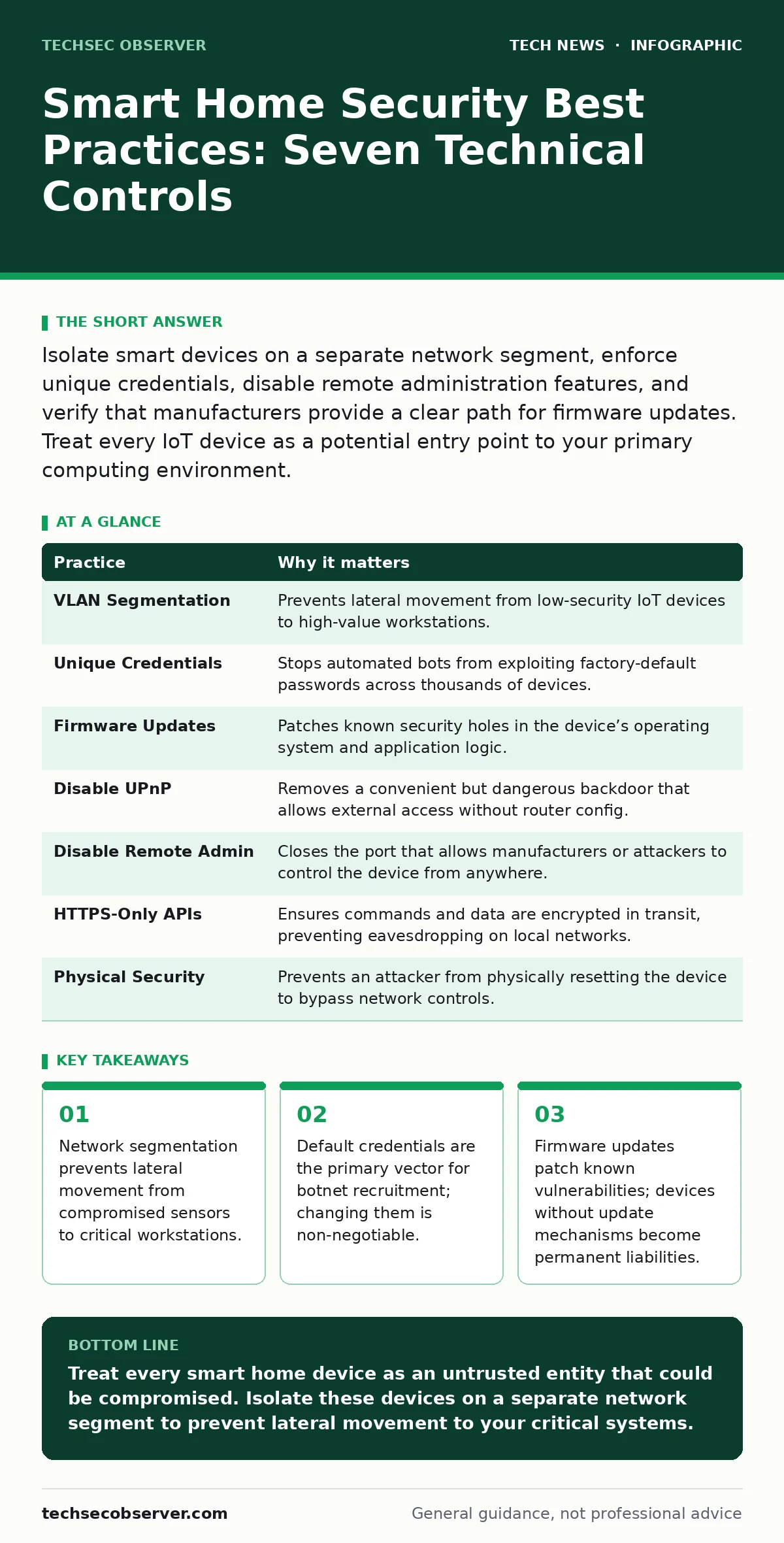
Isolate smart devices on a separate network segment, enforce unique credentials, disable remote administration features, and verify that manufacturers provide a clear path for firmware updates. Treat every IoT device as a potential entry point to your primary computing environment.
1. Isolate IoT Traffic on a Dedicated VLAN
Consumer routers often place all connected devices on the same broadcast domain. This means a compromised smart bulb can scan for and attack your laptop or smartphone. You must create a separate Virtual Local Area Network (VLAN) for Internet of Things (IoT) devices. This isolation ensures that even if a device is breached, the attacker cannot pivot to your primary systems.
Most home routers hide this feature behind "Guest Network" settings. While not a true VLAN in enterprise terms, a guest network typically blocks device-to-device communication. Configure your smart home devices to connect only to this isolated network. Ensure that this network has no access to your main LAN, but retains internet access for cloud commands.
| Practice | Why it matters |
|---|---|
| VLAN Segmentation | Prevents lateral movement from low-security IoT devices to high-value workstations. |
| Unique Credentials | Stops automated bots from exploiting factory-default passwords across thousands of devices. |
| Firmware Updates | Patches known security holes in the device’s operating system and application logic. |
| Disable UPnP | Removes a convenient but dangerous backdoor that allows external access without router config. |
| Disable Remote Admin | Closes the port that allows manufacturers or attackers to control the device from anywhere. |
| HTTPS-Only APIs | Ensures commands and data are encrypted in transit, preventing eavesdropping on local networks. |
| Physical Security | Prevents an attacker from physically resetting the device to bypass network controls. |
2. Change Default Credentials Immediately
Manufacturers often ship devices with generic usernames and passwords to simplify initial setup. Attackers use automated scripts to scan the internet for these known combinations. If you leave the defaults, your device becomes part of a botnet within hours of connection. You must change both the username and password to a unique, complex string.
Do not rely on the initial setup wizard if it allows you to skip credential creation. Some devices allow local web interface access without authentication. Check the device’s documentation for how to disable anonymous access. Refer to our guide on encryption to understand how strong passwords protect data at rest and in transit.
3. Disable Universal Plug and Play
Universal Plug and Play (UPnP) allows devices to automatically configure ports on your router. This convenience enables a malware-infected device to open a port to the internet, bypassing your firewall rules. You should disable UPnP on your router entirely. If a device requires port forwarding, configure it manually and only for the specific device.
Imagine a smart camera that uses UPnP to open port 80 to the internet. An attacker can now access the camera’s web interface directly, ignoring your router’s security settings. By disabling UPnP, you force all external connections to be explicitly permitted by you. This adds friction for attackers and removes a common attack vector.
4. Verify Firmware Update Mechanisms
A device that cannot update is a device that will eventually be compromised. Manufacturers discover and patch vulnerabilities over time. If a device does not support automatic or easy manual updates, it becomes a security liability. Before purchasing, check if the manufacturer provides a clear history of security patches.
Some devices require you to manually download firmware files and upload them via a web interface. This process is error-prone and often neglected. Prefer devices that offer over-the-air updates. If a device has not received an update in over a year, consider it deprecated. See our guide on certificate management to understand how devices verify that updates are authentic and untampered.
5. Disable Remote Administration Interfaces
Many smart home devices include remote administration features, allowing you to control them from outside your home. These interfaces often run on less secure protocols or have weaker authentication. Unless you have a specific need for remote configuration, disable these features. Use local network access for administration.
Remote administration often exposes the device to the public internet. Attackers scan for these exposed interfaces constantly. By keeping administration local, you restrict access to your physical network. If you must access the device remotely, use a secure tunnel such as SSH or a VPN, rather than opening a direct port.
6. Enforce HTTPS for Local APIs
Many smart home devices use HTTP for local communication. HTTP transmits data in plain text, allowing anyone on your network to intercept commands and credentials. You should ensure that your devices support HTTPS, which encrypts data in transit. Check the device’s documentation for API security details.
If a device only supports HTTP, consider blocking it from your network entirely. Some advanced routers allow you to block specific protocols. Alternatively, use a reverse proxy that terminates HTTPS and forwards requests to the device’s HTTP interface. This adds a layer of encryption between your control app and the device.
7. Secure Physical Access to Devices
Physical access often overrides digital security. An attacker with physical access can reset a device to factory settings, bypassing your network controls. They can also plug a device into your network directly, bypassing your wireless security. Secure your smart home hubs and routers in locked locations.
Imagine a visitor who plugs a rogue USB device into your smart hub. This device could inject malicious firmware or extract credentials. Use physical locks or cases for sensitive hardware. Disable USB ports on devices if they are not required for operation. This prevents an attacker from using physical access to compromise your network.
8. Audit Third-Party Integrations
Smart home ecosystems often rely on third-party skills or integrations. These integrations may request broad permissions, allowing them to control multiple devices. You should review the permissions granted to each integration. Revoke access for integrations you no longer use.
Suppose a voice assistant skill requests permission to control all your smart locks. If that skill is compromised, the attacker can unlock your doors. Limit permissions to the minimum required for the integration to function. Regularly audit your connected apps and remove those that are inactive. Refer to our guide on macOS security settings for principles of least privilege that apply here.
9. Monitor for Anomalous Traffic
Even with strong controls, attacks can occur. Monitoring your network for unusual traffic can help you detect a breach early. Look for large amounts of outbound traffic from IoT devices, which may indicate a botnet command and control channel. Use a router with traffic logging or a dedicated network monitoring tool.
Anomalous traffic may also indicate a device has been repurposed for malicious activities. If a smart bulb starts sending data to an unknown server, investigate immediately. Disconnect the device from the network and reset it. Regular monitoring helps you maintain visibility into your smart home environment.
Key takeaways
- Network segmentation prevents lateral movement from compromised sensors to critical workstations.
- Default credentials are the primary vector for botnet recruitment; changing them is non-negotiable.
- Firmware updates patch known vulnerabilities; devices without update mechanisms become permanent liabilities.
Treat every smart home device as an untrusted entity that could be compromised. Isolate these devices on a separate network segment to prevent lateral movement to your critical systems.
Frequently asked questions
Can I use a cheap router for my smart home network?
Yes, but ensure it supports VLANs or guest networks that block device-to-device communication. Cheap routers often lack the processing power to inspect traffic effectively.
Do smart home devices need antivirus software?
Most IoT devices do not run general-purpose operating systems and cannot support traditional antivirus. Security relies on firmware updates and network segmentation.
How often should I check for firmware updates?
Enable automatic updates if available. If manual updates are required, check monthly. Devices that do not offer updates should be replaced.
Is Wi-Fi more secure than wired connections for IoT?
Wired connections are generally more secure as they prevent wireless eavesdropping. However, both require proper network segmentation to be safe.
How this guide was produced: written by the TechSec Observer editorial team with AI assistance, checked against the public references listed below, and reviewed when the facts change. See our editorial policy or report an error.