Cloud Compliance Standards: Mapping Rules to Infrastructure Code
Compliance frameworks often fail because they audit static configurations rather than the dynamic state of ephemeral cloud resources.

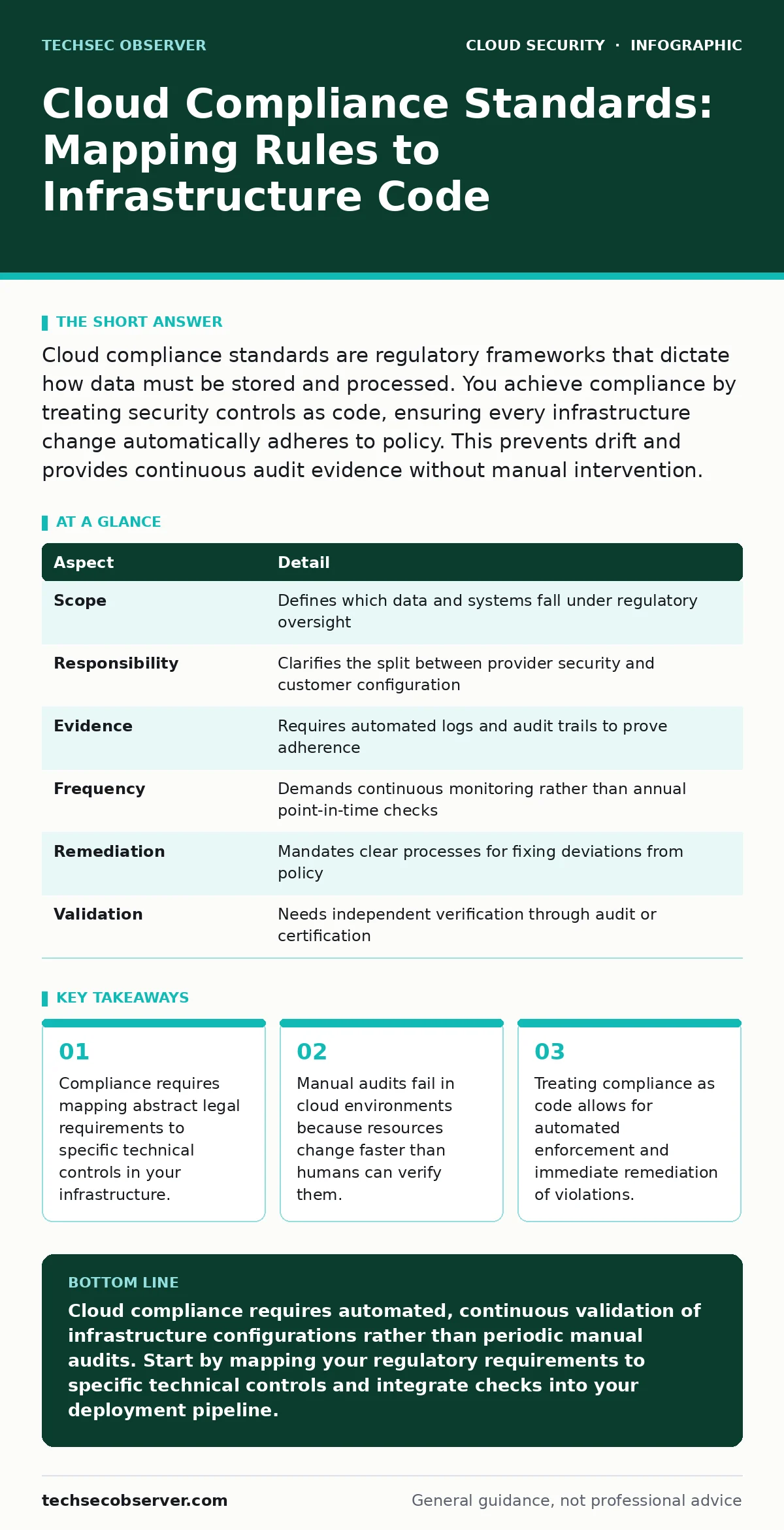
Cloud compliance standards are regulatory frameworks that dictate how data must be stored and processed. You achieve compliance by treating security controls as code, ensuring every infrastructure change automatically adheres to policy. This prevents drift and provides continuous audit evidence without manual intervention.
Understanding Cloud Compliance Standards
Cloud compliance standards are sets of rules and best practices that organisations follow to protect sensitive data and maintain security. These frameworks translate legal obligations into technical requirements for your cloud infrastructure. You cannot achieve compliance by simply buying a secure platform. The cloud provider secures the underlying hardware and network, but you remain responsible for how you configure and use those services. This shared responsibility model means your compliance posture depends entirely on your configuration choices.
Imagine a library that provides secure shelves and climate control but allows patrons to leave books on the floor. The library is secure, but your specific collection is not. In cloud computing, the provider manages the physical security of the data centres. You manage the access controls, encryption keys and firewall rules for your applications. Compliance standards bridge the gap between legal liability and technical implementation. They provide a common language for auditors and engineers to discuss risk. Without this mapping, you cannot prove that your systems meet regulatory requirements.
| Aspect | Detail |
|---|---|
| Scope | Defines which data and systems fall under regulatory oversight |
| Responsibility | Clarifies the split between provider security and customer configuration |
| Evidence | Requires automated logs and audit trails to prove adherence |
| Frequency | Demands continuous monitoring rather than annual point-in-time checks |
| Remediation | Mandates clear processes for fixing deviations from policy |
| Validation | Needs independent verification through audit or certification |
How Compliance Works in Dynamic Environments
Traditional compliance relied on periodic audits where inspectors reviewed static documents and configurations. Cloud environments change continuously as developers deploy new code and scale resources up or down. This dynamism breaks traditional audit models. A server that passed inspection yesterday may be misconfigured today due to an automated scaling event. You must shift from proving compliance at a single moment to demonstrating continuous adherence. This requires integrating compliance checks into your deployment pipeline. Every change to infrastructure must be evaluated against your security policies before it reaches production.
This approach is known as compliance as code. You define your security requirements in machine-readable formats such as policy-as-code files. These files specify allowed configurations for resources like storage buckets or virtual machines. Automation tools then enforce these policies during deployment.
If a developer attempts to create a resource that violates a rule, the system blocks the action. This prevents non-compliant configurations from ever reaching the production environment. It also generates the audit evidence required by regulators. You store these policy files in version control alongside your application code. This creates a historical record of every compliance decision made.
Who Is Affected by Cloud Regulations
Cloud compliance affects any organisation that processes personal data or operates in regulated industries. Healthcare providers must adhere to strict patient data protection rules. Financial institutions face rigorous requirements for transaction integrity and access control. Even small startups handling customer emails must comply with privacy laws. The impact extends beyond the primary data owner.
Third-party vendors and partners who access your cloud environment become part of your compliance scope. Their access must be controlled and monitored to the same standard as your internal staff. You cannot outsource your compliance responsibility to a cloud provider or a managed service provider. The legal liability for data breaches remains with the data controller.
Developers often feel excluded from compliance discussions, viewing them as legal hurdles. This perspective is incorrect. Developers write the code that defines how data flows through your systems. Their choices about encryption, authentication and logging directly determine compliance status. Security teams must collaborate with engineering teams to embed compliance requirements into the development lifecycle.
This collaboration reduces friction and prevents last-minute fixes that compromise security. When developers understand the "why" behind each control, they are more likely to implement them correctly. This cultural shift is necessary for sustainable cloud security. See the guide on DevSecOps for strategies on integrating security into development workflows.
Mapping Standards to Technical Controls
Abstract regulatory language must be translated into specific technical configurations. For example, a requirement to "protect data at rest" translates to enabling encryption on storage volumes. A rule about "access control" becomes a set of identity and access management policies. You must create a mapping document that links each compliance requirement to one or more technical controls.
This document serves as the source of truth for your compliance program. It helps auditors understand how your technical implementation satisfies legal obligations. It also helps engineers understand what they need to implement. Without this mapping, you risk implementing controls that do not address the actual requirements.
Consider the requirement for data residency. Regulations may mandate that certain data never leaves a specific geographic region. Technically, this means configuring cloud services to only operate in approved availability zones. You must also ensure that backup and disaster recovery processes respect these boundaries.
A backup service that replicates data to a different region for cost savings would violate this rule. You need technical controls that prevent cross-region data movement. These controls must be enforced at the platform level, not just through policy documents. Automated checks can verify that all new resources are created in compliant regions. This prevents accidental violations during rapid development cycles.
What People Usually Get Wrong
Many organisations treat compliance as a one-time certification exercise. They invest heavily in achieving initial certification and then neglect ongoing maintenance. This approach fails in cloud environments where configurations drift over time. Resources are created, modified and deleted frequently. Manual checks cannot keep pace with this rate of change.
You must implement continuous monitoring to detect deviations from your baseline. Compliance is not a destination but a continuous process. It requires constant validation and remediation. Another common mistake is relying solely on the cloud provider's security features. While providers offer robust security tools, you must configure them correctly. Default settings often prioritise ease of use over security.
Organisations also frequently misunderstand the scope of their data. They assume that only databases containing personal data need protection. In reality, logs, backups and temporary files may also contain sensitive information. These artifacts must be included in your compliance scope. Neglecting them creates blind spots that auditors will exploit. This inventory informs your technical controls and monitoring strategy. See the guide on infrastructure-as-code misconfigurations to understand how easy it is to accidentally expose sensitive data through poor configuration.
See also: Difference Between DevSecOps and SecDevOps: The Structural Reality · Cryptojacking: How to Detect and Stop Silent Resource Theft
Implementing Continuous Compliance Checks
You need automated tools to enforce compliance policies continuously. These tools scan your cloud environment for deviations from defined standards. They run checks against every resource, not just new deployments. This ensures that legacy resources are also compliant. When a violation is detected, the tool can automatically remediate the issue or alert your team.
Automated remediation is faster and less error-prone than manual fixes. However, you must design remediation actions carefully to avoid disrupting services. For example, blocking all access to a misconfigured database might cause an outage. A better approach is to restrict access to only authorised users while alerting the administrator. This balances security with availability.
Integrate these checks into your continuous integration and continuous deployment pipeline. This shifts compliance left, catching issues before they reach production. Developers receive immediate feedback on their changes. This reduces the time spent fixing compliance violations later. It also fosters a culture of security ownership. Developers learn to write compliant code from the start. You should also monitor for identity-related risks. See the guide on service account security to learn how to manage permissions for automated processes. Proper permission management is critical for maintaining compliance and preventing unauthorised access.
Maintaining Audit Evidence
Auditors require evidence that your controls are functioning correctly. This evidence includes logs, configuration snapshots and policy definitions. You must store this evidence securely and ensure its integrity. Tampering with audit logs is a serious violation of most compliance standards. Use immutable storage for your logs. This prevents anyone from altering historical records.
You should also implement strict access controls for audit data. Only authorised personnel should be able to view or export audit evidence. Regularly review your logging configuration to ensure it captures all relevant events. Missing logs can lead to failed audits and regulatory penalties. See the guide on MFA for cloud accounts to understand how to protect the accounts that manage these critical logs.
Next Steps for Your Organisation
Start by identifying which compliance standards apply to your organisation. Review your contracts and regulatory obligations. Create a mapping document that links requirements to technical controls. Implement automated scanning tools to detect non-compliant configurations. Integrate these checks into your deployment pipeline.
Train your developers on compliance requirements. Establish a process for continuous monitoring and remediation. This approach ensures that your cloud environment remains compliant over time. It also reduces the risk of data breaches and regulatory penalties. See the guide on cloud account hijacking to understand how compliance failures can lead to severe security incidents.
Key takeaways
- Compliance requires mapping abstract legal requirements to specific technical controls in your infrastructure.
- Manual audits fail in cloud environments because resources change faster than humans can verify them.
- Treating compliance as code allows for automated enforcement and immediate remediation of violations.
Cloud compliance requires automated, continuous validation of infrastructure configurations rather than periodic manual audits. Start by mapping your regulatory requirements to specific technical controls and integrate checks into your deployment pipeline.
Frequently asked questions
Do I need to comply with cloud standards if I only use SaaS applications?
Yes, if the SaaS application processes regulated data, you remain responsible for ensuring it is used in a compliant manner, including access controls and data retention.
Can my cloud provider certify my compliance for me?
No, providers can certify their own infrastructure, but you must certify your configuration and usage of those services to meet your specific compliance obligations.
How often should I run compliance scans?
You should run scans continuously or after every infrastructure change to detect and remediate drift immediately, rather than on a scheduled basis.
What happens if I fail a cloud compliance audit?
Failure can result in regulatory fines, loss of customer trust, and forced remediation, which often requires significant engineering effort to fix.
How this guide was produced: written by the TechSec Observer editorial team with AI assistance, checked against the public references listed below, and reviewed when the facts change. See our editorial policy or report an error.