Remote Desktop Abuse: Risks and Protection for Small Business
Attackers often bypass perimeter defences by exploiting overlooked administrative sessions that grant direct kernel-level access to critical systems.
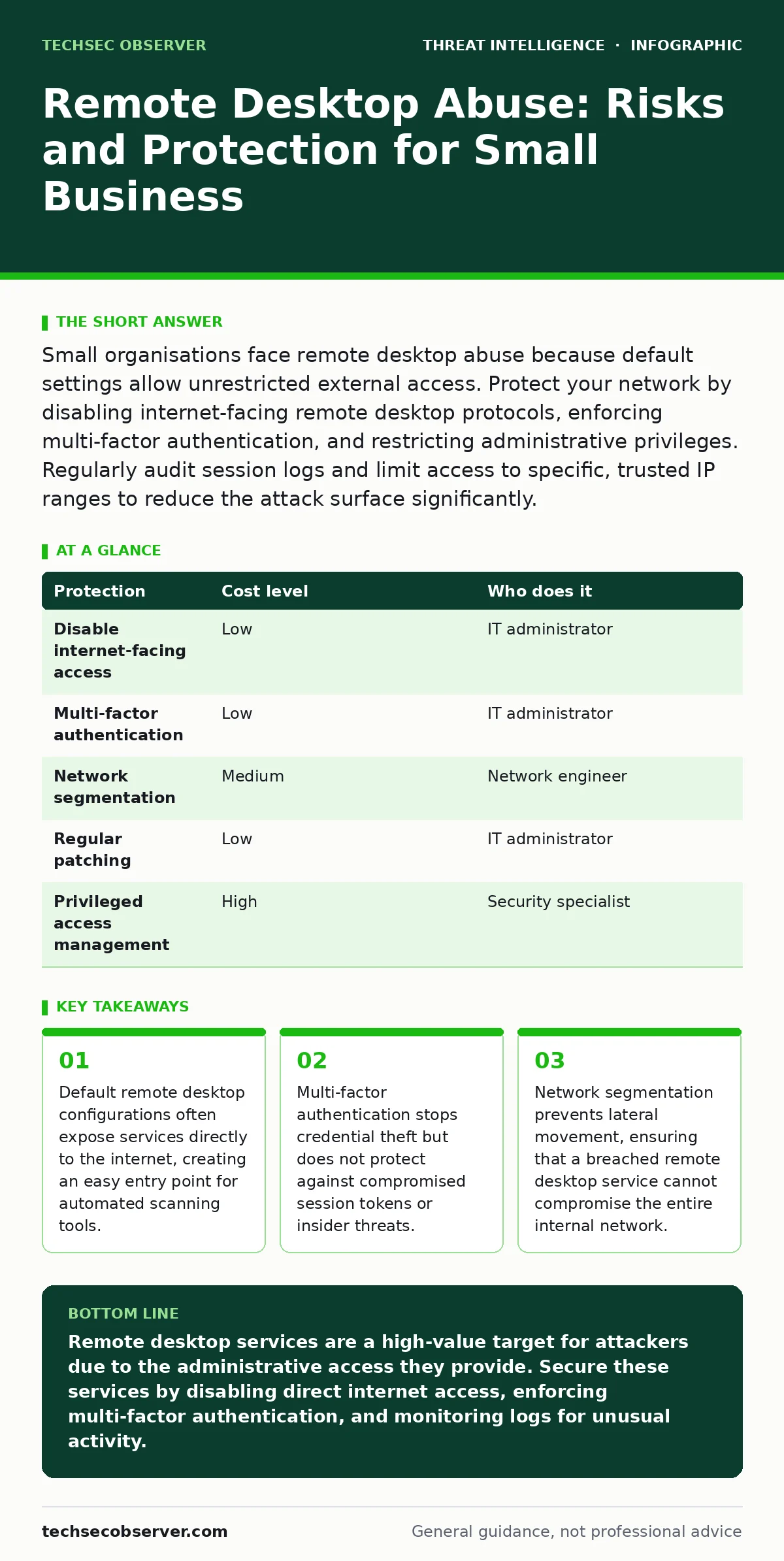
Small organisations face remote desktop abuse because default settings allow unrestricted external access. Protect your network by disabling internet-facing remote desktop protocols, enforcing multi-factor authentication, and restricting administrative privileges. Regularly audit session logs and limit access to specific, trusted IP ranges to reduce the attack surface significantly.
The Hidden Exposure of Administrative Access
Remote desktop protocols allow administrators to manage servers and workstations from a distance. This capability is convenient for maintenance but creates a significant security risk. Small organisations often leave these services accessible from the internet for ease of access. This decision removes the protective barrier of the corporate network perimeter.
Attackers use automated tools to scan the entire public IP address space. They look for open ports associated with remote desktop services. When they find one, they attempt to log in using common credentials or stolen password lists. If the service is exposed, the attacker does not need to phish an employee or exploit a software vulnerability. They simply knock on the door and walk in if the lock is weak.
The risk is amplified by the high privileges usually granted to remote desktop accounts. Administrators often use these accounts to perform system updates, install software, and modify configurations. If an attacker gains access, they inherit these high-level permissions. They can install malicious software, create new user accounts, and disable security tools. This level of access allows them to move laterally through the network with ease.
Why Small Organisations Remain Vulnerable
Small businesses often lack dedicated security staff to monitor network traffic. They rely on default configurations provided by operating systems or cloud providers. These defaults prioritise usability over security, leaving services exposed. The assumption that "no one will find us" is a dangerous miscalculation. Automated scanners do not care about the size of the organisation; they target any open port they can find.
Another factor is the reuse of credentials. Employees may use the same password for their email and their remote desktop access. If an email account is compromised, the attacker can try that same password on the remote desktop service. This technique, known as credential stuffing, is highly effective against organisations that do not enforce unique passwords for different services.
Furthermore, small teams often operate with a single administrative account. If that account is compromised, the attacker has full control over the system. There is no separation of duties to limit the damage. This centralisation of power simplifies the attacker's task. They only need to breach one account to compromise the entire infrastructure.
Low-Cost Protections That Work
You can significantly reduce the risk of remote desktop abuse without expensive security appliances. The first step is to disable direct internet access to remote desktop services. Instead, use a virtual private network to create a secure tunnel. This ensures that only authenticated users within the VPN can access the remote desktop service. It hides the service from public scanners entirely.
| Protection | Cost level | Who does it |
|---|---|---|
| Disable internet-facing access | Low | IT administrator |
| Multi-factor authentication | Low | IT administrator |
| Network segmentation | Medium | Network engineer |
| Regular patching | Low | IT administrator |
| Privileged access management | High | Security specialist |
Multi-factor authentication adds a second layer of verification. Even if an attacker has the correct password, they cannot log in without the second factor. This factor is usually a code generated by an app on a mobile device or a hardware token. This measure stops most automated attacks and credential theft attempts. It is a critical control that should be enabled for all administrative accounts.
Network segmentation divides your network into smaller, isolated zones. If an attacker breaches the remote desktop service, they are confined to that specific zone. They cannot easily jump to other parts of the network where sensitive data resides. This limits the blast radius of a successful breach. Implementing segmentation requires careful planning but provides a strong defensive layer.
The Limits of Standard Defences
Many organisations believe that multi-factor authentication is sufficient. This is a misconception. MFA protects the login process but does not protect the session itself. If an attacker steals an active session token, they can bypass MFA entirely. This is why monitoring active sessions is just as important as securing the login.
Another hidden cost is the complexity of management. Adding layers of security increases the difficulty of administrative tasks. IT staff may find it harder to perform routine maintenance. This can lead to workarounds, such as disabling security controls for convenience. These shortcuts undermine the entire security posture. You must balance security with usability to ensure compliance.
What to Ask Your IT Provider
If you outsource your IT management, you must verify their security practices. Do not assume that standard maintenance includes security hardening. Ask specific questions to understand their approach to remote access. This ensures that your provider is actively managing the risk rather than just keeping the lights on.
- How do you secure remote desktop services against external attacks?
- Do you enforce multi-factor authentication for all administrative access?
- How often do you audit remote access logs for suspicious activity?
- What is your process for patching operating systems and remote desktop software?
- How do you handle privileged access management and account separation?
These questions reveal the depth of their security operations. A provider who cannot answer these questions clearly may not be adequately protecting your infrastructure. You need a partner who understands the specific threats facing remote access services.
See also: vlans for home network: isolate traffic without buying enterprise gear
Monitoring and Response Strategies
Detection is key to minimising damage. You should monitor remote desktop logs for unusual activity. Look for login attempts from unexpected locations or at unusual times. Also, watch for multiple failed login attempts, which may indicate a brute-force attack. Automated alerts can help you respond quickly to these indicators.
If you detect a breach, isolate the affected system immediately. Disconnect it from the network to prevent lateral movement. Then, investigate the extent of the compromise. Check for new user accounts, installed software, and changes to system configurations. This forensic analysis helps you understand the attacker's actions and close any remaining gaps.
Integrating with Broader Security Practices
Remote desktop security does not exist in isolation. It must be part of a broader security strategy. Consider how remote access interacts with other security measures. For example, if you use DNS tunneling for data exfiltration detection, ensure that remote desktop traffic is also monitored for similar patterns.
Similarly, your approach to LSASS credential theft prevention should extend to remote desktop sessions. Attackers often target the LSASS process to steal credentials from memory. Ensure that your endpoint protection tools are configured to detect and block such activities. This layered approach increases the difficulty for attackers.
For more insights on behavioural detection, see our guide on user and entity behavior analytics. Understanding how normal activity looks helps you identify anomalies in remote access logs. Additionally, consider reading about reducing your digital footprint to minimise the visibility of your services to external scanners.
Key takeaways
- Default remote desktop configurations often expose services directly to the internet, creating an easy entry point for automated scanning tools.
- Multi-factor authentication stops credential theft but does not protect against compromised session tokens or insider threats.
- Network segmentation prevents lateral movement, ensuring that a breached remote desktop service cannot compromise the entire internal network.
Remote desktop services are a high-value target for attackers due to the administrative access they provide. Secure these services by disabling direct internet access, enforcing multi-factor authentication, and monitoring logs for unusual activity.
Frequently asked questions
Is it safe to use remote desktop for home offices?
It can be safe if you use a virtual private network to connect securely. Never expose remote desktop services directly to the internet without additional security layers like multi-factor authentication.
How do I know if my remote desktop service is exposed?
Use online port scanning tools to check if your remote desktop port is accessible from the internet. If it is open, configure your firewall to block external access and require a VPN connection.
What is the difference between RDP and SSH?
RDP provides a graphical interface for Windows systems, while SSH is a command-line protocol used primarily for Unix and Linux systems. Both require strong authentication and careful configuration to prevent abuse.
Can multi-factor authentication stop all remote desktop attacks?
No, MFA stops credential-based attacks but does not protect against session hijacking or insider threats. You must also monitor active sessions and restrict administrative privileges to maintain security.
How this guide was produced: written by the TechSec Observer editorial team with AI assistance, checked against the public references listed below, and reviewed when the facts change. See our editorial policy or report an error.